 Among my many other geeky duties, I help with system administration and system maintenance at the school where my wife works. Recently, their web server began to flake out — the system would reboot or hang for no obvious reason. It fell to me to investigate. I determined that the system motherboard was dying. The hardware was three to four years old, and the Linux distribution it ran at least a couple years older than that. It was definitely time for a new web server, top to bottom.
My wife and I set out the local computer mega-mart and were presented with a bit of a quandary. In the past, I had purchased low-end Intel Celeron-based PCs running Linspire from the mega-mart for about $300 list, or as little as $250 on sale. While these machines are more the quality of hamburger than steak in terms of their components and really have nothing to write home about in terms of performance, they’re perfect as a web or file server for a school or non-profit. Unfortunately, no computers were available for less than $400 (give or take a few dollars). Even worse, the $400 PCs that were available ran Windows Vista Home Basic. It seemed like a poor choice to pay for a Microsoft Windows license that was never going to be used.
So, my wife and I hiked to the other end of the mega-mart to buy the parts necessary to put a machine together. We had a few criteria for the machine I would build. It had to be cheaper than $400. It also had to run Fedora Core 6 Linux well (I know, I know there are probably better choices… but it’s like the old joke says “How did God create the Universe in only seven days? He had no installed base” — the school was already using Fedora). Finally, it had to be capable of providing web and mail service to the school. Here is the initial list of parts we purchased that night:
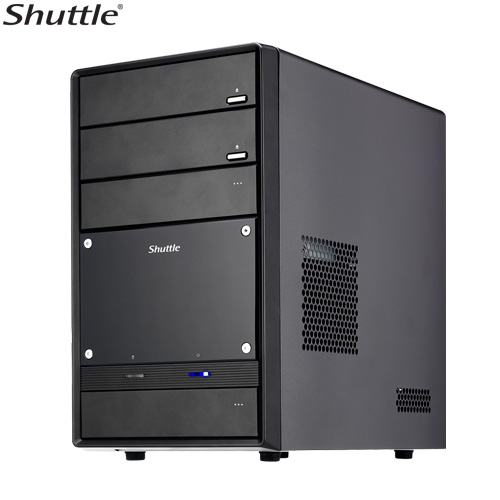
Shuttle SS21T – $114.99 (after $30 mail-in rebate)
AMD Athlon64 3200 AM2 – $79.00
Kingston 512MB PC6400 DDR2 RAM – $49.99
Seagate ST3160812AS-RK 160GB 7200RPM Serial ATA drive – $39.99 (refurbished)
SONY DDU1632/C1 16x Internal DVD-ROM drive – $29.99
I’ve built many PCs in the last 15 years, and this was my first experience building with a Shuttle Barebones system. I’d heard a lot of good things about them, and I certainly liked the small form factor. I figured I would now see if the SS21T lived up to the Shuttle hype.
The SS21T is what a do-it-yourself PC builder looks for in terms of fit and finish. It’s a nice, solid case that doesn’t flex or wobble as you insert components. The various trays and punch outs require a minimum of force to manipulate. The stamped metal edges are all smooth and rounded over, preventing any blood loss. To top it all off, the SS21T has a sleek, simple look that even my wife commented on… and she usually doesn’t notice these things, unless the computer has an Apple logo on it somewhere.
Where the SS21T breaks down is the chipsets on its motherboard. The network, graphics, and SATA disk controllers are all provided by the Silicon Integrated Systems 761GX and 966L chipsets. The gigabit network controller and Fedora Core 6 got along well right away. The other two controllers were more problematic.
The 761GX AHCI SATA controller is not supported by the Linux 2.6.18 kernel provided by Fedora Core 6 at install time. Fortunately, a recent upgrade of Fedora Core 6 installs a revision 2.6.20 kernel that does support the SATA controller. The work-around I used to get this upgrade installed is not for everyone, however. I installed an Adaptec 2940 SCSI controller and attached an external SCSI hard drive. I installed Fedora Core 6 to the SCSI drive and then upgraded the operating system. Once I set the “SiS Serial ATA Mode” to “AHCI” in the “Integrated Peripherals” settings in the motherboard BIOS, the OS was able to see the Seagate SATA disk. I was then able to copy the OS to the SATA disk and install an appropriate boot block. This situation will most likely be fixed in Fedora 7 and Ubuntu Feisty Fawn.
The graphics controller is not well-supported on open source operating systems. Fedora Core 6 was able to detect it, install an X configuration file, and start X Windows. The X desktop was riddled with visual artifacts and was sometimes prone to crashing with I tried to reconfigure at a lower screen resolution. A little reading on the Internet reveals that Silicon Integrated Systems does not release development kits to open source developers and any X drivers that exist are developed through reverse engineering. As this system was going into a school environment where teachers would be less intimidated by a GUI than by a text console, I elected to spend a few more dollars on a real graphics card that I knew was supported in Linux:
3D Fuzion GeForce 6200LE Video Card, PCI Express, 256MB DDR $59.99
Everything went well after resolving those two issues.
My overall impression of the Shuttle SS21T is neutral. There were some Linux installation problems because of the Silicon Integrated Systems chipsets on the motherboard. Historically, SiS is a budget vendor in the chipset game, and SS21T loses some points for using SiS chips instead of Nvidia or Intel. The system gains those points back because it has a cool, clean look and has a nice finish both inside and out. If you are looking for a budget web server or workstation (total cost $373.95, not including software), you might be able to do better, but you could do far worse.






 Among my many other geeky duties, I help with system administration and system maintenance at the school where my wife works. Recently, their web server began to flake out — the system would reboot or hang for no obvious reason. It fell to me to investigate. I determined that the system motherboard was dying. The hardware was three to four years old, and the Linux distribution it ran at least a couple years older than that. It was definitely time for a new web server, top to bottom.





Really helpful article. I too went to the store to pick up a bare bones pc for a linux box, and came home with an SS21T. After several hours of fighting with bios settings, changing all the cables, and scratching my head, I stumbled on the right set of keywords to find this article. I was able to get a Fedora installation that recognized the SATA chipset, and bought a cheap video card to fix the video problems. Maybe if I had found it I’d have bought something else, but having already bought it, this article proved to be invaluable.
Thank you very much
Comment by Mark — April 28, 2007 @ 11:33 am
To all the uninitiated out there – read this and take heed. This is good stuff. Thanks.
Comment by Pete — February 5, 2008 @ 11:06 am